Home
A UI library for Python Game-development
UI has been one of the hardest parts for Python game development. Users either have to ship their own UI tooling or use ones that are old, ugly, outdated, or too complex for the simple problem.
CoshUI is different, it's something you add into your game loop — completely side stepping the complexity of external DSLs — and define the UI you want straight in Python.
An Example with Pygame
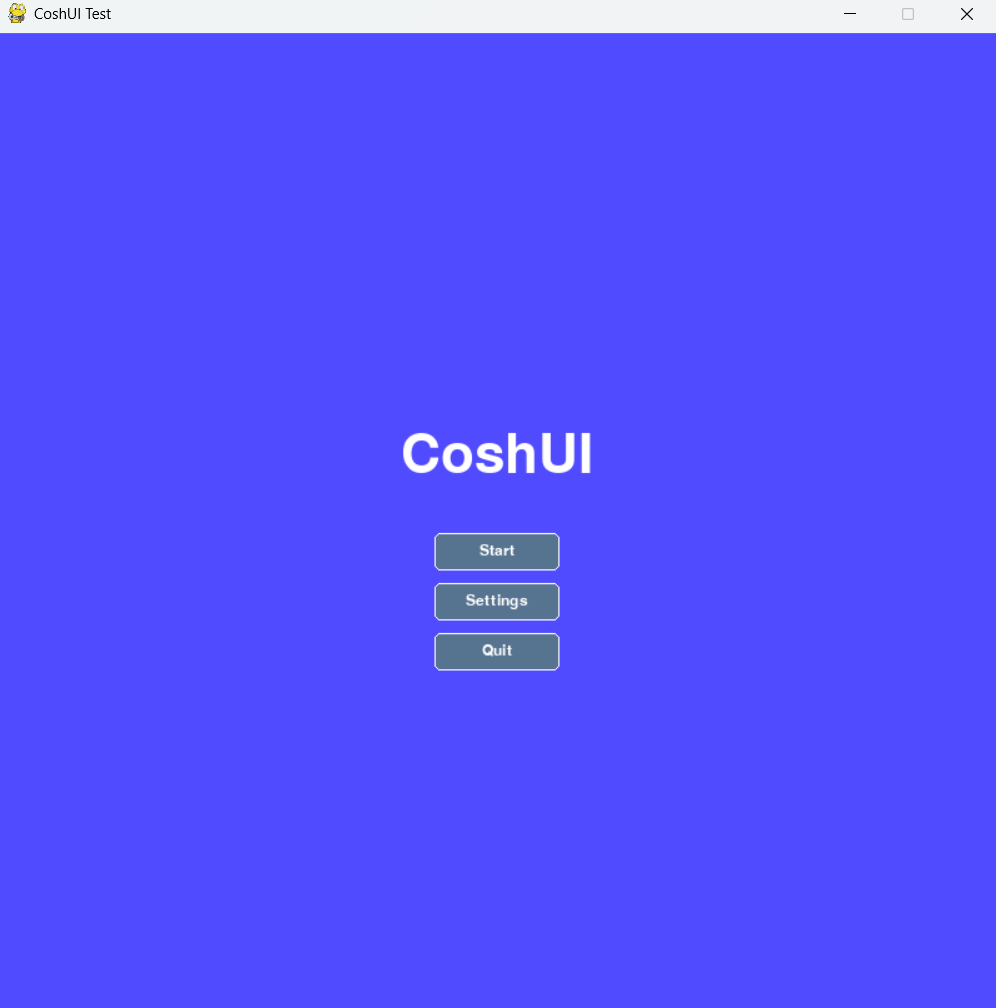
CoshUI lets you build UIs that slot into any game loop easily. The highlighted code in the left-side code-block outlines all the code needed to produce the image on the right.
import coshui as cui
import pygame as py

WIDTH, HEIGHT = 800, 800
FPS = 60
BLACK = (0, 0, 0)

def main():
    py.init()
    screen = py.display.set_mode((WIDTH, HEIGHT))
    py.display.set_caption("Pygame CoshUI Test")
    clock = py.time.Clock()

    running = True
    while running:
        for event in py.event.get():
            if event.type == py.QUIT:
                running = False

        screen.fill(BLACK)

        with cui.CoshUIRenderer(cui.PygameBackend(screen)):
            with cui.Container(id="root_container", width=cui.FILL, height=cui.FILL, padding=20, align=cui.ALIGN_CENTER, justify=cui.JUSTIFY_CENTER, style=cui.CoshStyling(background_color=(80, 75, 255))):
                with cui.Container(id="menu_stack", direction=cui.COLUMN, gap=10, align=cui.ALIGN_CENTER):
                    cui.Label(id="title", text="CoshUI", font_size=64)
                    cui.Button(id="start_btn", text="Start Game")
                    cui.Button(id="settings_btn", text="Settings")
                    cui.Button(id="quit_btn", text="Quit")

        if cui.get_signal("quit_btn", cui.CLICKED):
            running = False

        py.display.flip()
        clock.tick(FPS)

    py.quit()

if __name__ == "__main__":
    main()
Features
CoshUI can do quite a lot of things, from flexbox-like capabilities to animations. Here's a fraction of what is included:
-
Backend Agnostic Architecture
CoshUI's core doesn't care about rendering the UI to the screen. It merely sets the necessary data through bundled up instructions called a
RenderContextand sends that to the backend for rendering, making the swap between CPU-centered frameworks likePygameto GPU-accelerated frameworks likeRaylibpossible. -
State Persistence & Animation Loops
The library is technically immediate mode, but due to the reconciliation layer of CoshUI, it lets
Nodessave their previous states, making it a sort of hybrid between immediate and retained mode. This makes it possible for animations to work, as all it does is slowly change the value over the specified time. -
Additive Signal Register
Unlike other UI libraries that use callbacks to determine interaction events, CoshUI takes a page out of Godot's book and implements a signal system. Nodes will always emit an interaction signal and users can check whether that signal is happening by accessing it through the
get_signal()function. -
The Box Model
CoshUI's user-facing API takes heavy inspiration from HTML and CSS, like determining UI structure through indentation like HTML with Python's context managers, to flexbox-like API and reusable styling from CSS. And just like them, every UI element is inherently a box.
To learn more, it is encouraged to start with the tutorial or to read the API.
Jump In
-
Get Started
-
Build Your First UI
-
Read the Architecture
-
Check What is New