Padding and Margin
Quick Guide
| Property | Type | Default | Recursive or Local |
|---|---|---|---|
padding |
float | int |
0.0 | Local |
margin |
float | int |
0.0 | Local |
Introduction
As explained in the Overview section, padding and margin determines the space around and within your nodes, exactly like CSS.
Do note, padding only exists for ParentNodes (e.g., Container, Grid, Modal), whilst margin exists for all Nodes.
with cui.CoshUIRenderer(...):
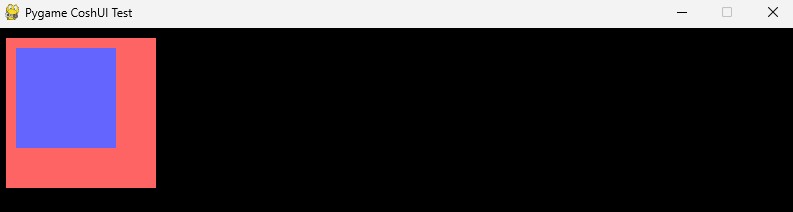
    with cui.Container(id="example_container", width=150, height=150, padding=10, margin=10, style=cui.CoshStyling(background_color=(255, 100, 100))):
        cui.Container(id="sub_container", width=100, height=100, style=cui.CoshStyling(background_color=(100, 100, 255)))
The code-block above will show the inner container being 10 pixels offset from the top-left of the outer container. At the same time, the outer container should be 10 pixels offset from the top-left of the screen.
Unlike CSS
CoshUI's padding and margin is a little primitive compared to CSS. With the current version (v0.3.0) targeting specific sides is not supported as of yet. The attributes only take in integers/floats.
Default Behavior
The default behavior of padding and margin is 0.0 if they aren't set and they're not set in the Current Theme.